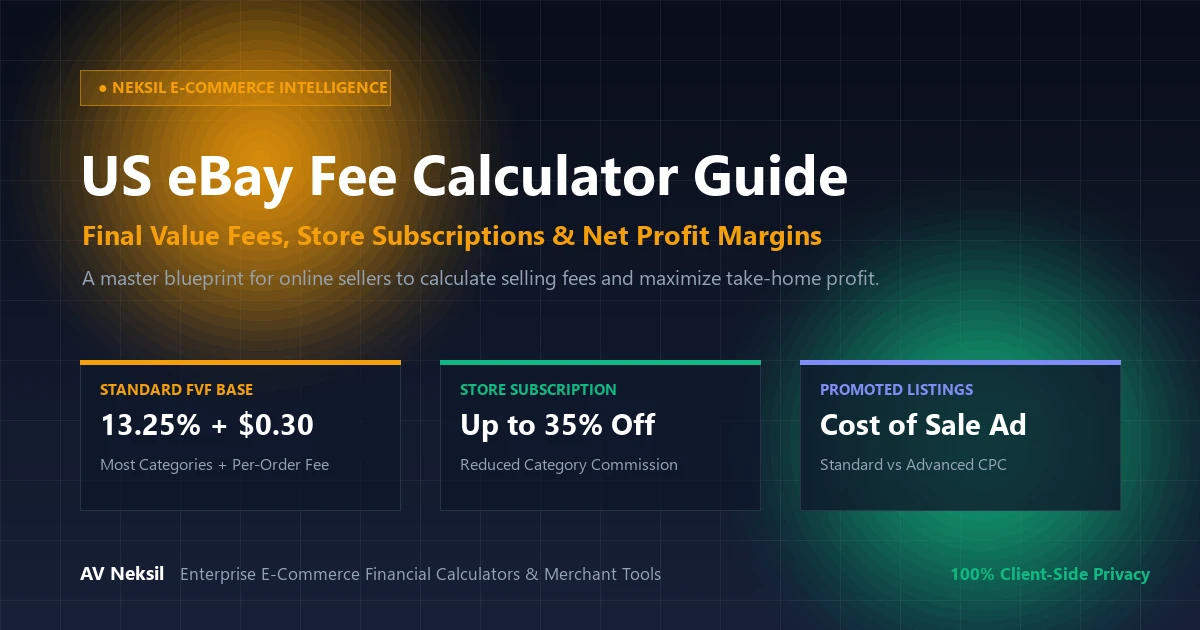
Selling on eBay remains one of the world’s most lucrative e-commerce opportunities, but navigating the marketplace’s intricate fee structure is the difference between thriving profitability and running at a hidden loss. Because eBay calculates its Final Value Fee (FVF) not just on the item’s purchase price, but on the entire transaction amount—including buyer shipping charges and government sales tax—sellers must model their overhead prior to sourcing inventory. By deploying an advanced, interactive eBay Fee Calculator, online merchants can dissect exact category commission rates, store subscription discounts, and advertising fees to lock in predictable net margins.
Whether you are an established eBay powerseller optimizing wholesale margins, a part-time reseller flipping thrifted collectibles, or an international merchant generating invoices with our Invoice Generator, accurate cost modeling is paramount. In this masterclass guide, we break down every fee tier, formula, and profit optimization tactic across the eBay marketplace.
What Is an eBay Fee Calculator and Why Is It Vital for Sellers?
An eBay Fee Calculator is an e-commerce margin evaluation tool designed to simulate every deduction taken by eBay Managed Payments. Prior to listing an item, a calculator evaluates five core financial parameters:
- Final Value Fee (FVF) Base Percentage: The category-specific commission rate charged by eBay upon a successful transaction.
- Per-Order Fixed Transaction Charge: A fixed processing fee (typically $0.30 to $0.40) applied to each completed order.
- Sales Tax Impact: Because eBay collects and remits state sales tax on the seller’s behalf, the FVF percentage is assessed on the final gross total including tax, subtly increasing effective fees.
- Store Subscription Discounts: Fee reductions unlocked by maintaining a Basic, Premium, or Anchor eBay Store subscription.
- Optional Promotional Advertising: Ad spend deductions incurred via Promoted Listings Standard (cost-per-sale) or Promoted Listings Advanced (cost-per-click).
According to official marketplace fee documentation from the eBay Seller Center Selling Fees Portal, sellers who actively monitor category fee thresholds can save thousands of dollars annually simply by categorizing inventory under optimal sub-tier classifications.
The Core Mathematical Formulas Behind eBay Fees and Net Profit
To accurately project your take-home pay, our online tool applies the official eBay Managed Payments calculation sequence:
1. Total Amount of the Sale (Gross Basis)
eBay applies commission against the gross checkout total:
Total Sale Amount = Item Sale Price + Shipping Fee Charged to Buyer + Applicable Sales Tax
2. Total eBay Selling Fee
Total eBay Fee = (Total Sale Amount × Category FVF %) + Fixed Per-Order Charge ($0.30 or $0.40) + Promoted Listing Fee
3. True Net Take-Home Profit
Your true profit is the capital remaining after paying all product, shipping, and platform expenses:
Net Profit = (Item Price + Shipping Charged) – Total eBay Fee – Item Acquisition Cost – Actual Out-of-Pocket Shipping Label – Packaging Supplies
Standard eBay Final Value Fee Rates by Product Category
Commission rates vary significantly across product verticals. The table below illustrates the standard base rates for sellers without a store subscription versus those operating an eBay Basic Store:
| Category Vertical | Standard Rate (No Store) | eBay Store Subscriber Rate | High-Value Tier Break |
|---|---|---|---|
| Most General Categories (Clothing, Home, Toys) | 13.25% + $0.30 | 12.35% + $0.30 | Drops to 2.35% on portion over $7,500 |
| Computers, Tablets & Networking | 13.25% + $0.30 | 6.35% – 7.35% + $0.30 | Huge store discount; drops to 2.35% over $2,500 |
| Consumer Electronics & Cameras | 13.25% + $0.30 | 8.35% + $0.30 | Drops to 2.35% on portion over $2,500 |
| Guitars & Musical Instruments | 6.35% + $0.30 | 5.85% + $0.30 | Drops to 2.35% on portion over $7,500 |
| Athletic Shoes & Sneakers (> $150) | 8.00% (No fixed fee) | 8.00% (No fixed fee) | Reduced to incentivize sneakerhead marketplace |
| Fine Jewelry & Watches | 15.00% + $0.30 | 12.50% + $0.30 | Drops to 3.00% on portion over $5,000 |
When Does Opening an eBay Store Subscription Pay for Itself?
Opening an eBay Store (such as a Basic Store at approximately $21.95/month on an annual commitment) unlocks lower commission rates across high-volume categories like Electronics, Computers, and Musical Instruments. To calculate whether an eBay Store is mathematically justified, use this breakeven threshold:
Store Breakeven Rule: In the Computers and Electronics categories, where an eBay Store slashes commission from 13.25% down to 7.35% (a 5.9% fee reduction), selling just $375 worth of inventory per month saves more than the $21.95 subscription cost! Everything sold above $375 is pure additional profit in your pocket.
You can toggle between “Standard Account” and “Store Subscriber” directly inside our US eBay Fee Calculator to see your exact savings across different sales volumes.
Five Strategies to Slash eBay Fees and Maximize Margins
Savvy e-commerce operators deploy these five tactical maneuvers to keep fees at statutory minimums:
- Qualify for Top Rated Seller Plus (TRS+): Achieving Top Rated Seller status and offering 30-day free returns alongside 1-day handling qualifies your listings for a 10% discount on Final Value Fees.
- Set Precise Shipping Rate Tables: Inflating shipping charges causes eBay to assess high FVF fees on shipping money you do not keep. Using exact commercial rate discounts via platforms like Pirate Ship or eBay Labels preserves cash.
- Cap Promoted Listings Strategically: Instead of accepting eBay’s automated “suggested” ad rate (which can climb above 12%-15%), set a disciplined manual ceiling (e.g., 2% to 4%) on Promoted Listings Standard.
- Bundle Lower-Priced Items: Because the $0.30 or $0.40 per-order transaction fee is static regardless of order size, selling a single $30 bundle is far more profitable than selling six individual $5 items (which would incur $2.40 in fixed fees).
- Cross-Compare With Companion Profit Models: Use our specialized eBay Profit Calculator to run sensitivity models on return rates, lost packages, and packaging materials.
Step-by-Step Guide: How to Calculate eBay Fees on Neksil
Calculating your net profit takes less than 30 seconds:
- Access the Calculator: Open the free US eBay Fee Calculator on Neksil.
- Enter Listing Price & Shipping: Input your item’s sale price and any shipping fee charged to the buyer.
- Select Store Level & Category: Choose whether you have a standard account or an eBay Store, and select your item’s primary category from the dropdown.
- Enter Sourcing & Shipping Costs: Input the wholesale cost of the item and your actual out-of-pocket shipping label cost.
- Inspect Net Profit and ROI: Instantly review your net take-home dollar profit, percentage margin, and total marketplace fees.
Frequently Asked Questions (FAQ)
Common questions from online retailers and auction sellers:
Does eBay charge fees on sales tax collected?
Yes. Under eBay Managed Payments rules, the Final Value Fee percentage is applied to the total gross amount paid by the buyer, including sales tax remitted to state revenue departments. However, the fixed per-order charge ($0.30) is only applied once.
What is the International Fee on eBay?
If you sell to a buyer whose registered address is outside the United States, eBay assesses an additional 1.65% International Fee on the transaction total to cover cross-border currency conversions and banking rails.
Is the Neksil US eBay Fee Calculator free to use?
Yes. All tools across the Neksil Suite are 100% free with zero registration, subscription fees, or limits on calculation volume.
Conclusion: Protect Your Margins with Accurate Math
In high-velocity e-commerce, guessing your margins is a recipe for wasted effort. By evaluating every inventory purchase through our interactive US eBay Fee Calculator, you ensure that every product you list generates healthy, predictable profits. Run your numbers today and take total command of your e-commerce financial performance.