Finding the best table capture chrome extension has become an urgent priority for modern professionals seeking to liberate structured datasets from websites into functional spreadsheets. Whether you are aggregating competitive e-commerce pricing, building B2B lead lists, auditing stock market filings, or harvesting academic directories, browser-based table scrapers eliminate the tedious friction of manual data entry. However, as legacy utilities erect aggressive paywalls and cap free exports at just 250 rows, discovering a truly free, high-performance alternative is essential.
🏆 Executive Summary: The Leading Table Scrapers in 2026
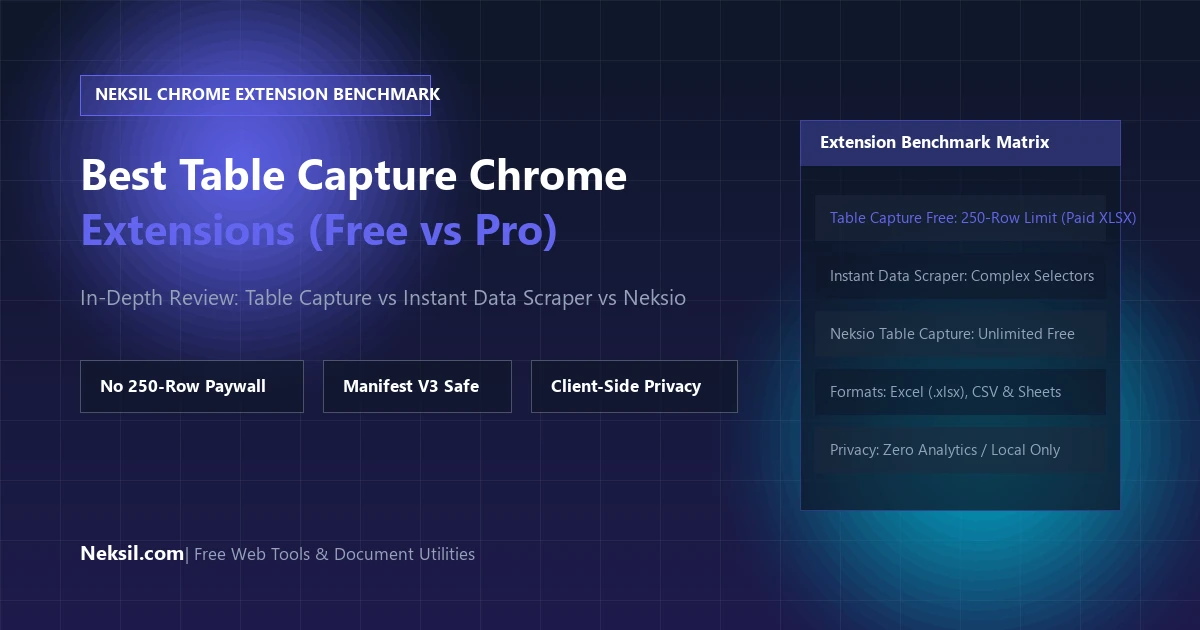
- Best Overall & 100% Free: Neksio Table Capture — Delivers completely unlimited row exports, 1-click native Excel (.xlsx) and CSV downloads, automatic
<div>grid detection, and strict client-side privacy without requiring paid subscriptions. - Legacy Market Leader: Table Capture (by George Mike / Kitchen Table Software) — Highly capable extension, but strictly restricts free tier users to 250 rows per export and locks direct Excel file generation behind an ongoing Pro subscription ($12/year or $3/month).
- Best for Heuristic Page Scraping: Instant Data Scraper — Utilizes an algorithmic heuristic model to detect repeating elements. Effective for uniform catalogs, but lacks manual cell editing and precision region selection.
- Best for Complex XPath Workflows: Web Scraper & Simplescraper — Feature-rich automated crawlers tailored for developers, though accompanied by a steep technical learning curve.
1. Why Table Capture Extensions Have Replaced Complex Scraping Code
Only a few years ago, extracting structured data from web pages required spinning up headless Python browsers with BeautifulSoup, Selenium, or Scrapy, configuring HTTP headers, and manually managing proxy rotation. For corporate analysts, research associates, and sales representatives, these technical barriers were insurmountable.
Browser extensions fundamentally transformed this workflow by operating directly inside the client context. Because a table capture chrome extension executes within your active Google Chrome browser session, it inherently bypasses three massive bottlenecks that defeat external scrapers:
- Client-Side Rendering (DOM Execution): Modern Single-Page Applications (SPAs) built on React, Vue, and Next.js do not send complete HTML tables from the web server. Instead, JavaScript renders elements dynamically into the browser’s Document Object Model (DOM). In-browser extensions capture the final, fully rendered state with 100% fidelity.
- Authentication & Session Cookies: Intranet portals, ERP systems, internal Salesforce reporting grids, and password-protected SaaS analytics cannot be accessed by external URLs. A browser extension runs inside your authenticated session, allowing instant extraction without sharing your login credentials.
- Zero-Setup Speed: Rather than configuring code environments, users can click a single button, preview tabular arrays in an interactive modal, and download an organized
.xlsxor.csvspreadsheet in under three seconds.
2. Evaluating Table Capture (Kitchen Table Software) & The Pro Paywall
Developed by George Mike under the banner of Kitchen Table Software, Table Capture is historically one of the earliest and most widely adopted extensions in the Chrome Web Store. It established the baseline standard for highlighting HTML tables and copying data to the system clipboard or Google Sheets.
However, as the extension evolved, its commercial monetization model introduced friction points that have led thousands of users to search for a viable kitchen table exporter alternative:
Key Limitations of Table Capture Free Tier:
- Strict 250-Row Maximum: If you are attempting to export an e-commerce catalog of 500 items or an employee directory of 1,000 records, the free version truncates data after row 250, forcing users to either purchase a subscription or split tables manually.
- Excel (.xlsx) Downloads Locked Behind Pro: In the free tier, direct downloads to native Microsoft Excel (.xlsx) files are disabled. Users are limited to copying raw clipboard data or routing through Google Sheets.
- Subscription Pricing: Unlocking Table Capture Pro requires an ongoing subscription fee ($12 per year or $3 per month), which becomes difficult to justify for casual researchers or small business teams.
3. Neksio Table Capture: The Next-Generation Free Benchmark
Recognizing the limitations of paywalled extensions, Neksio Table Capture was engineered from the ground up as a pure Manifest V3 browser utility designed to deliver enterprise-grade extraction completely free of charge.
Unlike legacy tools that treat modern spreadsheet downloads as premium upsells, Neksio provides an open, privacy-first architectural approach:
Unlimited Row Exports
There are zero artificial paywalls. Whether your web table contains 10 rows or 50,000 rows, Neksio captures and exports the complete dataset without truncation.
Native 1-Click Excel (.xlsx)
Generates compliant OpenXML Microsoft Excel workbooks directly in your browser. Download authentic .xlsx files with pre-formatted column headers at the click of a button.
Dynamic CSS Grid & Div Parser
Modern websites frequently avoid <table> tags. Neksio’s DOM analysis engine automatically detects CSS Grid and Flexbox tabular structures, reconstructing them into relational matrices.
Zero Data Tracking & Privacy
All parsing and file compilation occurs 100% locally in your browser memory. No scraped records, confidential financials, or browsing telemetry are ever transmitted to external servers.
Tired of 250-Row Limits on Table Capture?
Switch to Neksio Table Capture today. 100% Free Forever, unlimited rows, instant Excel downloads, and zero subscriptions required.
4. Detailed Side-by-Side Benchmark Matrix
To provide an objective overview of the competitive marketplace, here is how the top table scraping extensions measure against each other in real-world performance:
5. Migration Walkthrough: Transitioning from Table Capture Pro to Neksio
Transitioning your data extraction workflow from paid tools to Neksio Table Capture requires zero learning curve. The interface is purposefully intuitive:
- Step 1: Visit the official Chrome Web Store listing for Neksio Table Capture and click “Add to Chrome”.
- Step 2: Open your target webpage containing your data table. Neksio automatically inspects the DOM and highlights active tables.
- Step 3: Click the Neksio icon in your extension bar. Review the live tabular preview window to inspect rows, columns, and numeric formatting.
- Step 4: Click “Export to Excel (.xlsx)” or “Download CSV”. The formatted file saves straight to your local Downloads folder in milliseconds.
If your source tables reside within static PDF documents or scanned invoices rather than active HTML web pages, you can also leverage our dedicated browser-based Free PDF to Excel Converter on Neksil. Furthermore, explore our comprehensive catalog of 236+ online calculators, converters, and web developer tools at Neksil Online Utilities.
6. Real-World Use Cases: Who Benefits Most from Neksio Table Capture?
Across diverse industries, browser-based table capture accelerates research and eliminates data entry overhead:
- E-Commerce Sellers & Amazon Merchants: Scrape competitor pricing matrices, review counts, stock levels, and product specification grids across Shopify, Amazon, and Walmart stores without writing web scraper scripts.
- Financial Analysts & Equity Researchers: Pull historical balance sheets, quarterly income statements, and dividend payout tables from Yahoo Finance, Morningstar, and SEC EDGAR filings directly into financial models.
- Digital Marketers & SEO Strategists: Export Google Search Console query tables, Ahrefs/Semrush keyword ranking reports, and competitor backlink lists into actionable spreadsheets for client reporting.
- HR & Recruitment Teams: Harvest staff rosters, company leadership directories, and professional conference attendee tables into clean CSV files for recruitment outreach.
7. Frequently Asked Questions (FAQ)
Is there a completely free alternative to Table Capture Pro?
Yes. Neksio Table Capture is a 100% free alternative that provides unlimited row extraction, native Microsoft Excel (.xlsx) downloads, CSV generation, and dynamic CSS grid capture without any subscription fees or 250-row artificial limits.
Why does Table Capture stop exporting after 250 rows?
The 250-row restriction in George Mike’s Table Capture is an intentional commercial paywall designed to encourage users to upgrade to Table Capture Pro ($12/year). To extract larger datasets with thousands of rows without paying a subscription, you can switch to Neksio Table Capture, which has no row limitations.
Does Neksio Table Capture work with Google Sheets?
Yes. In addition to direct Microsoft Excel (.xlsx) and CSV downloads, Neksio Table Capture includes a “Copy Clean Table” function. This copies the data into your system clipboard with clean tab-delimited formatting, allowing you to press Ctrl + V in any Google Sheets document to populate your data instantly.
Is my data safe when using Neksio Table Capture?
Completely. Neksio Table Capture is built adhering to the strict Google Chrome Manifest V3 standard and executes 100% of its parsing locally in your browser memory. No data records, usernames, session cookies, or browsing history are ever transmitted to remote servers.
8. Final Verdict: Selecting the Best Table Extractor
While legacy extensions like Table Capture helped pioneer the web-to-spreadsheet workflow, restrictive paywalls and row caps have made modern work unnecessarily frustrating. By adopting Neksio Table Capture, you unlock unlimited row extractions, instant native Excel workbooks, dynamic CSS grid parsing, and uncompromising privacy—all wrapped in a clean, modern interface.
Install the extension from the Chrome Web Store today, and discover how effortless web data collection can truly be.